
Suppose you run a banking app. Month-end is coming, and customers are pulling statements. You want to load test the statement endpoint, but the question you need answered is: can people still post transactions while that’s happening?
Turning up every request in a recording makes that harder to answer. You’ve increased both workloads, and their combined average latency can hide a slowdown in the one you care about.
I’d rather increase statement traffic, keep transaction posting steady, and measure posting on its own. That’s what endpoint and session load plans let you do.
- Give each endpoint or user journey its own schedule so you can see how one affects another.
- Check the endpoint that matters during the busiest part of the test. Require enough samples to trust the result.
- A mock can make a dependency predictable without making it faster. Ours was 2.6% slower than a fast local dependency in 30 matched runs.
Give each workload its own schedule
In Speedscale, you use a filter to select recorded traffic and put it in a load group. That group can contain one endpoint, several endpoints, or complete user journeys. Each gets its own schedule and goals.
For the banking example, I’d put statements in one group and transaction posting in another. Then I can ramp up statements while sending posting requests at a steady rate.
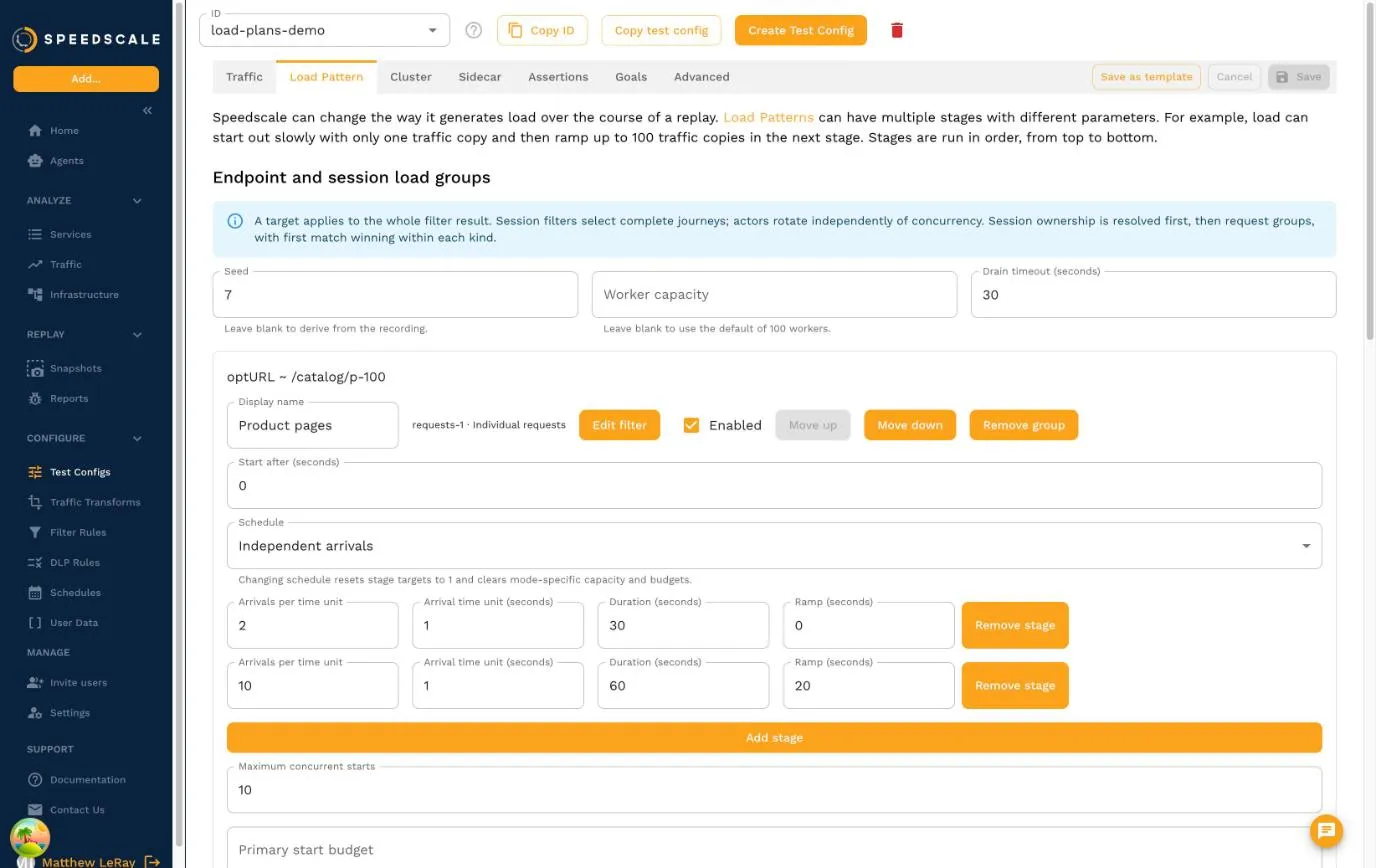
This screenshot uses our storefront demo. The product page requests have their own schedule, just as statement requests would in the banking app.
The scheduling choice matters. Arrivals start requests or journeys at a set rate, even when the app slows down. Concurrent sessions keep a chosen number of journeys active, starting another as one finishes.
If you’ve used JMeter, splitting workloads into Thread Groups will feel familiar. k6 explains the difference between independent arrivals and workers that wait in its open and closed workload models.
Load plans also support Adaptive TPS, which adjusts workers within a group’s budget to reach a request-rate target. Traffic copies and recorded multiples let you scale the workload you recorded.
You can combine these schedules with chaos rules. For example, increase statement traffic and add dependency latency while keeping posting traffic steady. If the generator can’t start work on schedule, missed starts fail the run by default.
Replay the whole user journey
Sometimes a single endpoint is enough. Other times, the transaction only makes sense after someone has logged in and looked up an account.
A session group selects recorded users whose journeys match your filter, then replays each complete journey. You can still measure just the transaction request within it.
The number of recorded users and the number active at once are separate settings. You might have 100 eligible users with ten journeys running at a time.
Rotate cycles through those users, Sticky prefers to reuse an available user, and Once runs each user exactly once. The same user never runs two journeys at the same time.
Increasing concurrency doesn’t create accounts. If you clone a journey, you need identity fields and transforms that produce accounts the app accepts. A new customer ID won’t provision a bank account for you.
For a closer look at how recorded sessions work, see the Datadog Synthetics walkthrough.
Decide what would fail the test
Here’s the banking test I’d start with: keep posting at two starts per second while statements ramp from five to twenty. During the final twenty seconds, require posting p95 response-header latency to stay below 500 milliseconds.
That goal applies to posting alone, during the busy part of the test. Set a minimum sample count, too. If there aren’t enough samples, the goal fails.
If you’ve used k6 thresholds, the idea is similar. Here, the goal applies to a selected group of replayed requests and a time window.
The report shows planned starts, actual starts, HTTP attempts, failures and latency for each group. It also separates work finishing after the schedule ends. Successful HTTP responses alone don’t tell you whether the generator delivered the load you asked for.
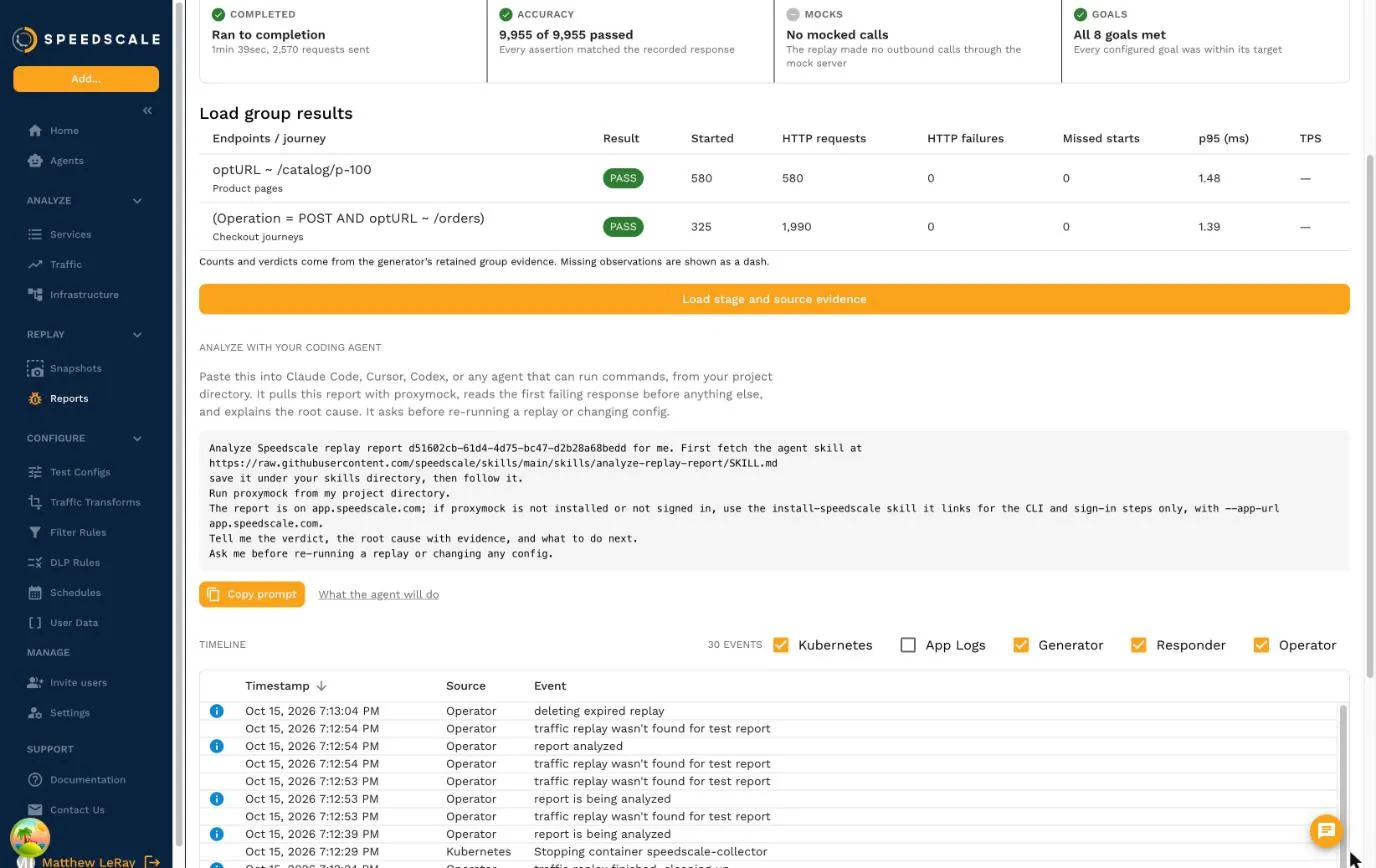
We caught a reporting bug this way during development. The Kubernetes generator sent exactly 100 statement requests and 50 posting requests, but an older analyzer in staging dropped their throughput verdicts. The acceptance check failed because those results were missing.
The mock surprised me
I expected mocking the statement dependency to make our local test loop faster. It didn’t.
Across eight matched real and mock trials, the median was 143.19 ms with the real local dependency and 149.46 ms with the mock. We timed resets, fixture discovery, complete sessions and checks against the bank’s request journal. Capture, process startup, cluster setup and uploads were excluded.
A repeat with 30 matched pairs using the tagged engine told the same story. The real dependency had a 133.88 ms median and 136.90 ms p95. The mock came in at 137.35 ms and 140.41 ms, making its median 2.59% slower.
Another local test was sharing the host, so these numbers describe that comparison rather than a capacity benchmark.
What I got was a predictable dependency. With proxymock handling statement responses, the bank’s authentication, transaction handling and workload generator still ran for real. The bank’s own journal let us check what reached the app.
We also ran separate Kubernetes acceptance tests against the operator, generator and cloud reports. The local loop couldn’t tell us whether those components preserved the load plan and its results.
There’s more on choosing which dependencies to replace in combining load tests with mocks.
Try one load test with two workloads
Pick an endpoint your users depend on. Give it steady traffic and a latency goal. Then increase traffic to another endpoint that shares its database, cache or thread pool, and see what happens.
Use request groups to test individual endpoints. Use session groups when login, account identity and the order of requests matter.
The sessions demo includes the banking app, its statement dependency and both tests:
cd sessions-demo
PROXYMOCK_BIN=/absolute/path/to/proxymock make bank-load-workers
The endpoint and session load plan guide walks through both banking plans, the dashboard and Kubernetes setup. For more on replaying traffic in a cluster, see Speedscale load testing and our Kubernetes load testing guide.
For the banking app, the result I want is straightforward: when statement traffic goes up, can people still post transactions within the latency limit?